HTTPS can only protect a site when the web server is configured with care. This guide examines a detailed Nginx setup for systems that use Nginx directly or place it in front of another application server. Although the directives are specific to Nginx, the underlying decisions about certificates, protocols, ciphers, and revocation checks apply to other web servers as well.
Before enabling HTTPS, prepare a private key, a certificate, and a directory where those files can be protected.
mkdir –p /path/to/sslA private key may be protected by a passphrase. That improves storage security, but it also means every unattended Nginx restart will pause and request the password. If operational requirements call for an unencrypted server key, create a separate copy with the protection removed.
openssl rsa -in /path/to/ssl/domain.com.key -out /path/to/ssl/domain.com.nopass.keyThe certificate chain also needs attention. Browsers may warn about a certificate when the issuing intermediate certificate is missing from the chain they receive. Combine the site certificate with each intermediate certificate in the correct order, ending with the root when required. An incorrectly assembled chain can produce errors such as:
ssl_ctx_use_privatekey_file("/path/to/ssl/domain.com.nopass.key") failed
   (ssl: error:0b080074:x509 certificate routines:
    x509_check_private_key:key values mismatch)
This message means the server is trying to pair the private key with a certificate that does not match it.
Place the unencrypted private key and assembled certificate in /path/to/ssl, then restrict access. Nginx commonly runs as either www-data or nginx.
chown –r www-data:www-data /path/to/ssl
chmod –r 400 /path/to/ssl/
These permissions allow the service account to read the certificate material while preventing broader access.
With the files prepared, configure HTTPS inside the Nginx server block. Start by enabling TLS and declaring the key and certificate paths.
listen 443;
ssl on;
ssl_certificate_key /path/to/ssl/domain.com.nopass.key;
ssl_certificate /path/to/ssl/domain.com.crt;
Nginx expects PEM-formatted keys and certificates. Although they can be combined in one file, keeping them separate is safer and easier to manage. Since Nginx 0.7.14, HTTPS can also be enabled directly on the listen directive.
listen 443 ssl;This minimal configuration is enough to establish an encrypted connection, but it still needs hardening before it should be exposed to untrusted traffic.
Enable only the protocol versions considered acceptable for the environment:
ssl_protocols tlsv1 tlsv1.1 tlsv1.2;Default Nginx configurations historically enabled SSLv3, while older releases could also support SSLv2. Both protocols were already unsafe and should not be used.
Session security depends on the algorithms used to negotiate and generate temporary keys. Because several older choices have been weakened or broken, explicitly select a cipher policy suitable for the clients the service must support.
A compact recommended cipher selection was:
ssl_ciphers "aes128+eecdh:aes128+edh";If compatibility with older platforms such as Windows XP was unavoidable, a broader list could be used:
ssl_ciphers "ecdhe-rsa-aes256-gcm-sha384:ecdhe-rsa-aes128-gcm-sha256:dhe-rsa-aes256-gcm-sha384:dhe-rsa-aes128-gcm-sha256:ecdhe-rsa-aes256-sha384:ecdhe-rsa-aes128-sha256:ecdhe-rsa-aes256-sha:ecdhe-rsa-aes128-sha:dhe-rsa-aes256-sha256:dhe-rsa-aes128-sha256:dhe-rsa-aes256-sha:dhe-rsa-aes128-sha:ecdhe-rsa-des-cbc3-sha:edh-rsa-des-cbc3-sha:aes256-gcm-sha384:aes128-gcm-sha256:aes256-sha256:aes128-sha256:aes256-sha:aes128-sha:des-cbc3-sha:high:!anull:!enull:!export:!des:!md5:!psk:!rc4";Tell clients to follow the server’s cipher preference rather than selecting their own:
ssl_prefer_server_ciphers on;Diffie–Hellman key exchange establishes a shared secret for each encrypted session. Generate dedicated parameters instead of relying on a generic set.
cd /path/to/ssl
openssl dhparam -out dhparam.pem 4096
Generation may take several minutes. Once it finishes, point Nginx to the resulting parameters.
ssl_dhparam /path/to/ssl/dhparam.pem;A client also needs to know whether the certificate has been revoked. Certificate Revocation Lists grow over time and can be expensive to download, while the Online Certificate Status Protocol asks about one certificate and allows the response to be cached. Nginx has supported OCSP stapling since version 1.3.7.
ssl_stapling on;
ssl_stapling_verify on;
resolver 8.8.8.8 8.8.4.4 valid=300s;
resolver_timeout 5s;
If the served chain does not already include the appropriate issuer certificate, configure it separately:
ssl_trusted_certificate /path/to/ssl/ca.crt;Nginx can now obtain and staple the certificate status response during the TLS handshake.
To keep browsers on encrypted connections, add the following response headers:
add_header strict-transport-security max-age=63072000;
add_header x-frame-options deny;
add_header x-content-type-options nosniff;
Strict Transport Security tells compatible browsers to use HTTPS for future requests. The additional headers prevent framing and MIME-type guessing. They should be enabled only after every required resource is available securely.
TLS consumes additional CPU and handshake time, so reuse established sessions with a shared cache:
ssl_session_cache shared:ssl:10m;
ssl_session_timeout 10m;
These directives can be placed in the Nginx http block. The keep-alive timeout can be tuned as well.
keepalive_timeout 70;A complete server block will resemble the following configuration:
listen 443;
ssl on;
ssl_certificate_key /path/to/ssl/domain.com.nopass,key;
ssl_certificate /path/to/ssl/domain.com.crt;
ssl_ciphers 'aes128+eecdh:aes128+edh:!anull';
ssl_prefer_server_ciphers on;
ssl_protocols tlsv1 tlsv1.1 tlsv1.2;
ssl_session_cache shared:ssl:10m;
ssl_stapling on;
ssl_stapling_verify on;
resolver 8.8.4.4 8.8.8.8 valid=300s;
resolver_timeout 10s;
ssl_dhparam /etc/ssl/certs/dhparam.pem;
add_header strict-transport-security max-age=63072000;
add_header x-frame-options deny;
add_header x-content-type-options nosniff;
When several HTTPS domains share one server, the TLS connection begins before the HTTP host is known. Without name-based TLS support, the server may return the first configured certificate. Assigning a separate IP address to every domain solves the problem but does not scale, while placing every name in one Subject Alternative Name certificate has practical limits. Server Name Indication allows the client to send the hostname during the handshake so Nginx can select the correct certificate. At the time, support included:
- Opera 8.0;
- MSIE 7.0 (Windows Vista and later);
- Firefox 2.0;
- Chrome (Windows Vista and later).
A production HTTPS policy always balances the required client support against the security properties the service is prepared to accept.
Finally, redirect clear-text HTTP traffic to the secure origin:
server {
        listen  80;
        server_name domain.com www.domain.com;
        return 301 https://domain.com$request_uri;
}
Every request will now be sent to the HTTPS endpoint.
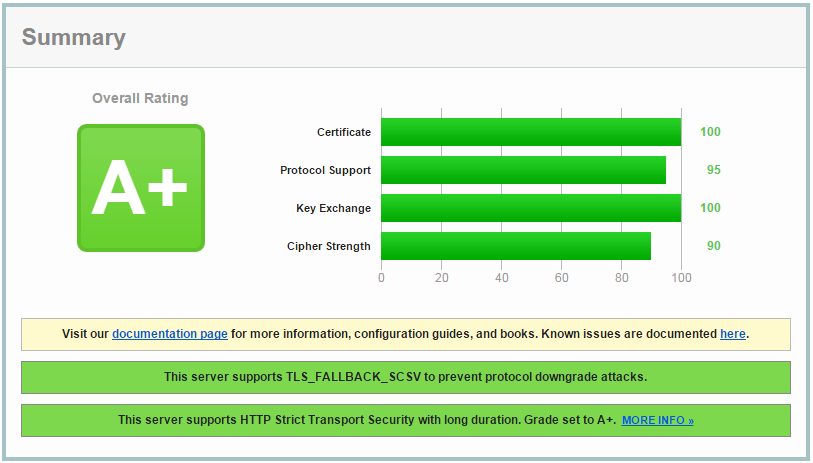
Reload Nginx and test the public configuration with https://www.ssllabs.com/ssltest/. A successful test should resemble the following result:
If this guide was useful, share it with colleagues and send any corrections or questions.
Reproducing this material on another website without the author’s permission is prohibited.