As a website grows, its workload may eventually exceed the capacity of the original server. A flexible cloud platform can often resize a machine in place; traditional hosting usually requires moving the application to new hardware. The challenge is not copying the files, but changing the live endpoint without losing traffic or splitting production data.
The obvious sequence—configure the new server, copy the database, change DNS, and turn off the old host—contains a serious gap. Browsers ask DNS resolvers where domain.com is located, and cached records may take days to expire. Some visitors will continue using the old address. If that server is offline, they see an error; if it remains active with the old application, writes can diverge between two databases and create a difficult reconciliation problem.
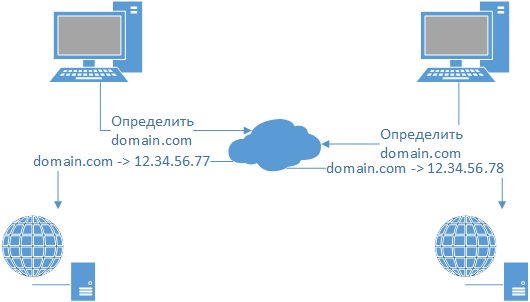
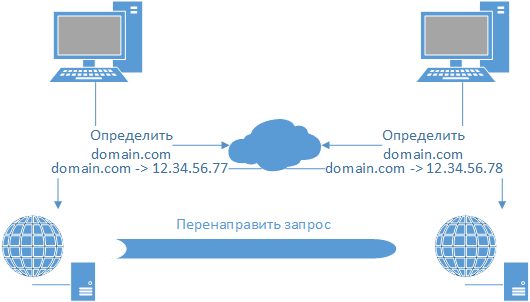
Nginx reverse proxying provides a clean transition. The old server continues accepting requests but forwards them to the new server. It becomes a temporary signpost at the network level: as DNS caches expire, traffic naturally shifts to the new address until the proxy is no longer used. A 301 redirect is not equivalent because users whose resolver still points to the old address may be unable to reach the new address reliably.
The examples use Debian, but the same approach works on other Linux systems. Before the cutover, the new server should already be configured, contain a current copy of the application, and pass functional checks.
If the old host already runs Nginx, or uses Nginx in front of Apache, proceed directly to configuration. Otherwise install Nginx from the distribution repository. Create or update the virtual host so that it resembles this proxy configuration:
server {
       listen 80;
       server_name domain.com www.domain.com;
       access_log /path/to/log/domain.com_access_log;
       error_log /path/to/log/domain.com_error_log info;
       root /path/to/site/;
       index index.html;
       charset utf-8;
       location / {
              proxy_pass http://12.34.56.78/;
              proxy_redirect off;
              proxy_set_header Host $host;
              proxy_set_header X-Real-IP $remote_addr;
              proxy_set_header X-Forwarded-For $proxy_add_x_forwarded_for;
              client_max_body_size 100m;
              client_body_buffer_size 128k;
              proxy_connect_timeout 90;
              proxy_send_timeout 90;
              proxy_read_timeout 90;
              proxy_buffer_size 4k;
              proxy_buffers 4 32k;
              proxy_busy_buffers_size 64k;
              proxy_temp_file_write_size 10m;
       }
}
With these directives, Nginx forwards every request to 12.34.56.78 and preserves the headers the new application needs to identify the original host and client. Keep access and error logging enabled on the old server: those logs reveal when resolvers have stopped sending visitors to it. Before activating the proxy, verify once more that the new server contains current data and behaves correctly.
Reload Nginx to begin the cutover. Most visitors will not notice the change; a very small number may see a transient error while the service reloads.
Once proxying is stable, update the domain’s DNS records. After several days, inspect the old server’s access logs. When requests have stopped, the proxy can be retired—the website has moved without a meaningful interruption.
More complex migrations, especially systems that must move a frequently written database with near-zero downtime, require additional replication and cutover planning beyond the scope of this guide.
If this guide was useful, share it with colleagues and send any corrections or questions.
Reproducing this material on another website without the author’s permission is prohibited.